
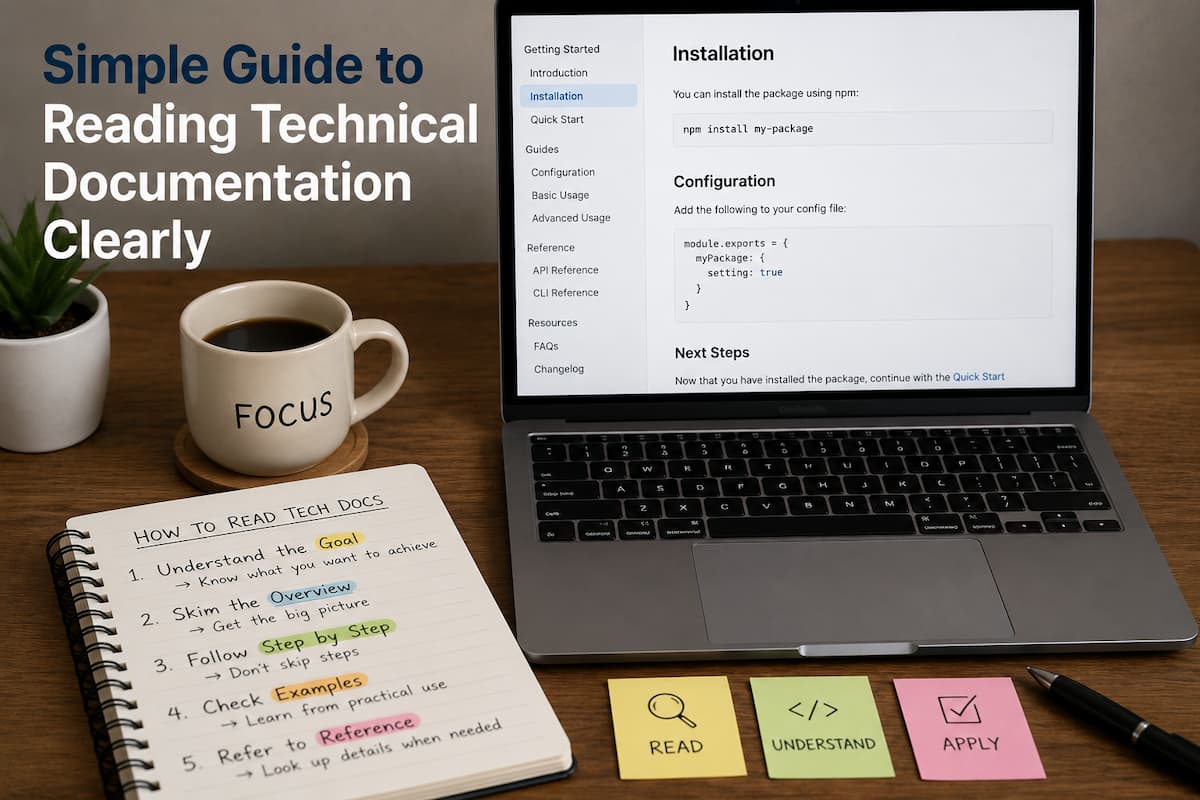
Technical documentation has a reputation for being difficult to read. Open a documentation page for a programming framework, cloud platform, or software library, and you’re often greeted with unfamiliar terminology, long explanations, code examples, and dozens of links leading to even more pages. It’s easy to feel like you have to understand everything before you write a single line of code.
The good news is that experienced developers don’t read documentation that way. They rarely begin at the first page and continue until the end. Instead, they approach documentation with a purpose. They know what problem they’re trying to solve, they search for relevant sections, and they treat documentation as a reference rather than a textbook.
Beginners often assume they must understand every paragraph before moving forward. This creates unnecessary pressure and can quickly turn learning into frustration. In reality, technical documentation is designed to answer specific questions. As your experience grows, you’ll naturally revisit the same documentation multiple times, understanding more with each visit.
This guide explains how to read technical documentation efficiently, avoid common learning traps, and build confidence when working with new technologies. Whether you’re learning a programming language, integrating an API, or exploring a software framework, these techniques will help you find useful information without becoming overwhelmed.
Change the Way You Think About Documentation
One of the greatest obstacles isn’t the documentation itself—it’s the expectation that you need to understand everything immediately.
Imagine buying a new camera with a 300-page instruction manual. Most people don’t read every page before taking their first photo. They learn the basic controls, begin using the camera, and return to the manual whenever they encounter something unfamiliar.
Technical documentation works much the same way.
Instead of viewing documentation as something to complete, think of it as a reference that supports your current task.
This simple mindset shift removes much of the pressure associated with learning new technologies.
Begin with a clear objective.
Before opening documentation, ask yourself one question:
“What am I trying to accomplish?”
Without a goal, you may find yourself jumping from topic to topic, and before you know it, the amount of information can become overwhelming.
For example, compare these two approaches:
Approach A
A developer opens an API documentation website and begins reading from the introduction. After thirty minutes, they’ve learned about authentication methods, rate limits, versioning, SDKs, webhooks, and error handling—but they still haven’t made their first request.
Approach B
Another developer opens the same documentation with one objective:
“I want to send my first successful API request.”
Everything they read now supports that specific goal.
The second approach usually produces faster progress and better understanding.
Understand the Structure Before Reading the Details
Most technical documentation follows a predictable structure.
Spending a few minutes understanding that structure often saves much more time later.
Instead of reading immediately, scan the table of contents.
Notice sections such as:
- Getting Started
- Installation
- Tutorials
- API Reference
- Configuration
- Examples
- Troubleshooting
- Frequently Asked Questions
Each section serves a different purpose.
For example, an API reference is designed to describe individual functions or endpoints. It’s not usually the best place for beginners to learn how the system works.
Understanding where information is located makes future searches much easier.
Documentation Sections Explained
| Section | Primary Purpose |
|---|---|
| Introduction | Explains what the technology does |
| Quick Start | Helps beginners achieve an early success |
| Tutorials | Guides users through practical tasks |
| Configuration | Explains setup options |
| API Reference | Documents available functions or endpoints |
| Examples | Demonstrates real usage |
| Troubleshooting | Solves common problems |
Recognizing these categories helps you navigate documentation more efficiently instead of reading everything sequentially.
Don’t Read Every Word
Many beginners believe that skipping sections means they’re learning incorrectly.
Experienced developers do the opposite.
They skim first.
They look at headings, diagrams, examples, highlighted notes, warnings, and code samples before deciding which sections deserve closer attention.
Think of documentation as a map rather than a novel.
When using a map, you don’t examine every road equally. You focus only on the route that helps you reach your destination.
Documentation should be approached in the same way.
Reading selectively allows you to solve problems more quickly while gradually building broader knowledge over time.
Learn Through Small Practical Tasks
Reading becomes much easier when it’s connected to action.
Suppose you’re learning a new programming library.
Instead of reading fifty pages about every available feature, choose one small task.
For example:
Create a simple project.
Run the first example.
Modify one setting.
Observe what changes.
Then return to the documentation to answer new questions that arise.
This cycle of reading, experimenting, and returning to the documentation helps transform abstract concepts into practical understanding.
Expect Unfamiliar Terms
Every technical field has its own vocabulary.
Cloud computing, artificial intelligence, web development, cybersecurity, and databases all introduce specialized terminology.
It’s perfectly normal to encounter words you don’t recognize.
Rather than stopping every few minutes to research every unfamiliar term, try identifying which words are essential to your current objective.
When following an installation guide, you don’t need to understand every advanced configuration option.
Focus first on completing the installation successfully.
The remaining concepts can be explored later.
This approach reduces cognitive overload and maintains learning momentum.
Use Code Examples as Learning Tools
Code examples are often the most valuable part of technical documentation.
They demonstrate how concepts work in practice.
However, beginners sometimes make two opposite mistakes.
Some ignore examples entirely.
Others copy them without trying to understand what they’re doing.
A more effective strategy is to treat examples as experiments.
Read the code.
Run it.
Modify one small part.
Observe the result.
Changing one variable, one parameter, or one function at a time helps reveal how the system behaves.
Learning through experimentation is often much more memorable than reading lengthy explanations.
Keep Notes While Reading
Technical documentation frequently introduces important concepts that you’ll want to revisit later.
Instead of relying on memory alone, create simple notes.
These don’t need to be detailed summaries.
A few short observations are often enough.
For example:
- Authentication uses API keys.
- Configuration file controls database settings.
- Rate limits apply per account.
- Error responses include useful status codes.
Writing information in your own words reinforces understanding while creating a personal reference for future projects.
Focus on One Layer at a Time
Modern software systems often involve multiple technologies working together.
A web application, for example, may include:
- Front-end code
- Back-end services
- Databases
- Authentication
- APIs
- Cloud infrastructure
Trying to understand every layer simultaneously is overwhelming.
Instead, isolate one area.
If you’re learning an API, focus on making successful requests before studying deployment architecture.
If you’re learning a database, understand basic queries before exploring optimization techniques.
Building knowledge layer by layer creates a much stronger foundation than attempting to absorb everything at once.
Recognize That Documentation Improves With Experience
A documentation page that feels confusing today may seem surprisingly straightforward a few months later.
This doesn’t necessarily mean the documentation changed.
Your experience did.
As you complete more projects, you’ll recognize recurring patterns, understand common terminology, and connect new concepts to knowledge you already possess.
For this reason, revisiting documentation is not a sign of forgetting.
It’s a normal and valuable part of professional software development.
Even experienced engineers regularly return to official documentation when working with technologies they use every day.
Continuing from Part 1…
Follow a Simple Documentation Reading Workflow
Reading technical documentation becomes much easier when you follow the same process every time. Instead of jumping randomly between pages, work through a repeatable sequence that keeps your attention focused on the problem you’re trying to solve.
A practical workflow looks like this:
First, define your objective. Then locate the section most closely related to that objective. Read only enough to understand the next step, apply what you’ve learned, and observe the results. If something doesn’t work as expected, return to the documentation with a more specific question.
This approach turns documentation into an active learning tool instead of passive reading material.
An Example Workflow
| Step | What to Do | Why It Helps |
|---|---|---|
| Identify your goal | Define the task you want to complete | Keeps your reading focused |
| Find the relevant section | Use the table of contents or search feature | Saves time |
| Read carefully | Focus on instructions related to your task | Reduces information overload |
| Apply the instructions | Try the example in your own project | Reinforces learning |
| Review the results | Compare the outcome with expectations | Identifies misunderstandings |
| Return if needed | Read deeper only when necessary | Builds knowledge gradually |
Over time, this process becomes second nature and makes learning unfamiliar technologies much less intimidating.
Learn How to Search Documentation Efficiently
One reason official documentation feels overwhelming is that it often contains hundreds or even thousands of pages.
Fortunately, you rarely need to browse them manually.
Most documentation websites include an internal search feature that allows you to jump directly to relevant topics.
For example, instead of searching broadly for
“Authentication”
Search for something more specific, such as:
“API key authentication example”
or
“Authentication error 401”
Specific searches usually produce more useful results because they closely match the problem you’re trying to solve.
When searching externally, including the product name alongside your question can also help you locate the correct documentation page instead of unrelated blog posts or forum discussions.
Pay Attention to Warnings and Notes
Documentation often contains highlighted warning boxes, notes, or important notices.
These sections are easy to skip when you’re eager to make progress, but they’re frequently where developers explain common mistakes or important limitations.
For example, a warning might explain that
- A configuration setting only applies to certain operating systems.
- A feature requires a minimum software version.
- A command should not be used in production.
- Authentication credentials must be stored securely.
Reading these notes carefully can prevent hours of unnecessary debugging later.
Compare Multiple Examples
Documentation sometimes provides several examples for the same feature.
Instead of reading only the first one, compare them.
Ask yourself questions like:
- What changed between these examples?
- Why was this parameter added?
- Which values are required?
- Which settings are optional?
Looking for patterns across multiple examples helps you understand the underlying concept rather than memorizing individual commands.
This approach also prepares you to solve similar problems independently.
Build Understanding Instead of Memorization
A common beginner mistake is trying to memorize commands, syntax, or configuration options.
Experienced developers rarely rely on memory alone.
Instead, they focus on understanding how a system works.
For example, rather than memorizing every configuration option for a web server, they learn the following:
- What the server does.
- How requests are processed.
- Where configuration files are stored.
- Which settings affect security.
- How changes influence application behavior.
Once you understand the underlying concepts, looking up specific details becomes much easier.
Documentation becomes a reference instead of something you feel obligated to remember word for word.
Accept That You Won’t Understand Everything Immediately
Learning technical subjects is rarely a straight path.
Some topics make sense immediately, while others require repeated exposure before they become clear.
You might read the same documentation page several times over a few months and notice that each visit reveals something new.
This is a normal part of learning.
Each project adds practical experience, making future reading easier because you have more real-world context.
Instead of measuring success by how much documentation you’ve read, measure it by what you’re able to build and understand after applying what you’ve learned.
Combine Documentation with Practical Experience
Documentation explains how a technology is intended to work.
Hands-on practice shows how it behaves in real situations.
The strongest learning happens when these two activities support one another.
For example, after completing a tutorial, try making small changes.
Rename variables.
Modify configuration values.
Experiment with optional settings.
Observe how the software responds.
Each experiment transforms abstract explanations into practical understanding.
This active approach also makes future documentation easier to understand because you’ve already seen the concepts in action.
Know When to Read More Deeply
Not every situation requires the same level of detail.
If your goal is simply to install a tool and complete a beginner tutorial, reading advanced optimization or architecture sections may not be necessary.
On the other hand, if you’re preparing an application for production deployment, understanding configuration, security, scalability, and troubleshooting becomes much more important.
As your projects become more advanced, your reading habits should evolve accordingly.
Documentation is most valuable when the depth of your reading matches the complexity of your current task.
A Practical Checklist Before Closing the Documentation
Before moving on, ask yourself a few simple questions:
| Question | Why It Matters |
|---|---|
| Did I accomplish my original goal? | Confirms the documentation solved the intended problem |
| Can I explain what I just learned? | Reinforces understanding |
| Did I test the example myself? | Converts theory into practice |
| Did I note anything worth remembering? | Creates a useful personal reference |
| Do I know where to find this information again? | Saves time in future projects |
These small reflections help turn short reading sessions into lasting knowledge.
Practical Tips
Reading technical documentation becomes much less stressful when you treat it as a working companion rather than a textbook. Focus on solving one problem at a time, and don’t feel pressured to understand every feature immediately.
Experiment with examples whenever possible. Even small modifications help you understand concepts more effectively than simply reading explanations.
Keep a personal collection of notes, useful links, and common commands. Over time, this becomes a customized reference that’s often faster to consult than searching from scratch.
Finally, remember that revisiting documentation is a normal part of professional development. Even experienced engineers regularly return to official guides as technologies evolve and projects become more complex.
Common Mistakes
Many beginners unintentionally make learning more difficult than it needs to be.
Some of the most common mistakes include:
- Trying to read documentation from beginning to end like a book.
- Attempting to memorize every command and option.
- Ignoring practical examples.
- Searching without a clearly defined objective.
- Becoming discouraged by unfamiliar terminology.
- Skipping warning notes and important configuration details.
- Trying to learn multiple technologies simultaneously.
- Avoiding experimentation because of fear of making mistakes.
- Assuming experienced developers rarely consult documentation.
- Giving up after one confusing section instead of returning with more experience.
Recognizing these habits early can make learning much more enjoyable and productive.
Frequently Asked Questions
Should I read all the documentation before starting a project?
No. Most developers begin with the sections relevant to their immediate task and return to other parts as new questions arise. Reading with a purpose is generally more effective than trying to cover everything at once.
What should I do if I don’t understand a technical term?
Determine whether it’s essential for your current objective. If it is, spend a few minutes learning the concept before continuing. If not, make a note of it and revisit it later when you have more context.
Is it okay to copy code examples from documentation?
Yes, especially while learning. However, try to understand what each part of the example does, then experiment by making small changes to see how the behavior changes.
Why do experienced developers still read documentation?
Technology changes constantly. Documentation provides the most accurate information about current features, configuration options, updates, and recommended usage. Consulting documentation is a normal part of professional software development.
How can I avoid feeling overwhelmed by large documentation websites?
Focus on one goal, use the search function effectively, and read only the sections related to your current task. Breaking learning into small, manageable sessions is much more effective than trying to absorb everything in one sitting.
Should I rely only on documentation when learning a new technology?
Documentation is an essential resource, but combining it with practical projects, experimentation, and real-world problem-solving usually leads to a much deeper understanding.
Key Takeaways
- Technical documentation is a reference tool, not a book that must be read from beginning to end.
- Start every reading session with a clear objective.
- Learn the structure of the documentation before exploring the details.
- Focus on practical examples and apply them in real projects.
- Don’t worry about understanding every concept immediately.
- Search for specific questions instead of broad topics.
- Build understanding through experimentation rather than memorization.
- Revisit documentation regularly as your experience grows.
Conclusion
Reading technical documentation is a skill that improves with practice. The more projects you complete, the easier it becomes to identify the sections that matter, understand unfamiliar concepts, and apply new knowledge effectively. Rather than trying to master every page at once, approach documentation as a practical guide that helps you solve one problem at a time.
By setting clear goals, navigating documentation strategically, experimenting with examples, and accepting that learning is an ongoing process, you can transform documentation from something intimidating into one of your most valuable learning resources. Over time, you’ll spend less energy feeling overwhelmed and more time building useful projects with confidence.

Cathy started out teaching herself to code through documentation and broken tutorials, which taught her more about learning than any classroom did. Now she focuses on helping others navigate the same path — figuring out why things break, how to fix them, and what trends actually matter versus what’s just noise. She has a background in cognitive science and contributes to open-source education projects.